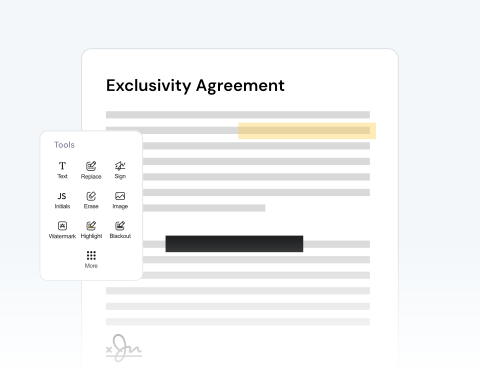
Modifier un PDF

Téléchargez un PDF et modifiez-le à l'aide de notre large gamme d'outils.

Choose your File

or drag and drop

SSL Encryption - Supports PDF up to 100 MB and other formats and extensions up to 25 MB

Excellent 4.6 out of 5

Using our PDF editor, quickly make critical or helpful changes, such as:

  • Modifier le texte existant ou ajouter et supprimer
  • Signez directement ou téléchargez votre signature
  • Dessinez directement sur le document
  • Obtenez n'importe quel format : PDF, PNG, JPG, Word, Excel, PowerPoint

Find out how to modify a PDF online below and optimize your productivity.

À l'aide de notre éditeur de PDF

Notre éditeur de PDF est très simple à utiliser :

1

Open your doc

Drag and drop your PDF or use the "Upload" button.

2

Use our edition features

Import images, add a signature, draw directly on the PDF, and more.

3

Convert your PDF

Change the format of your file to Word, JPG, etc, if necessary.

4

Save and share

Once you're happy with the document, download it and/or share it.

Edit PDF Files With MergedPDF to Avoid Mistakes and Increase Your Productivity

Annotate & comment on PDFs online

Highlight important terms in contracts or add study notes to your documents with our platform, which allows you to review and mark up documents instantly from any online device.

Effortless PDF editing to correct errors

Noticed a typo or mistake in your document? Upload your file in seconds and make corrections to a resume, update pricing on an invoice, modify dates, and more.

Add pictures and text to your document

Need to add an image? Or, want to include more text? You can easily insert company logos into reports, tack on new text fields, or circle critical details with our drawing features.

Optimize your document review process

You can share your PDF with others so that they can also add comments. This is very useful if you’re working with other contributors. Share directly from our site to speed up the process.

Make changes to files from any browser

Our platform is optimized for all major browsers, including Chrome, Safari, Firefox, and Edge. Simply make sure you have reliable access on any operating system.

Your trusted and secure PDF editor

Our mission is to provide the best PDF editor available. Our tool is reliable, secure, and produces the best results. We pride ourselves on customer satisfaction and make sure your files remain private.

Key Characteristics of PDF and Word Formats

  • PDF files (.pdf) keep your document’s layout intact across all devices and systems.
  • They can be compressed for easy sharing and support multimedia and interactive elements like videos, links, and fillable forms.
  • Word files (.doc/.docx) are popular for writing and editing text.
  • They offer flexible formatting options, like fonts, alignment, and layout, and support images, tables, and more.

MergedPDF Offers Multiple PDF Solutions

Start by creating a free account and make it easy to edit, convert, compress, and split your files!

  • Edit, convert, merge, and more with our platform
  • Get unlimited edits and downloads
  • Convert in multiple formats
  • 100% private and secure uploads and editing
  • 24/7 customer support

FAQ à propos de notre éditeur de PDF

Everything you need to know about editing documents.

Qu'est-ce qu'un éditeur PDF en ligne ?

Notre éditeur PDF en ligne est une plateforme numérique accessible via Internet qui propose des outils et des fonctionnalités pour modifier des fichiers PDF (Portable Document Format).


Contrairement aux logiciels autonomes qui nécessitent une installation, notre éditeur PDF en ligne fonctionne directement depuis votre navigateur Web, ce qui le rend pratique et souvent plus rapide pour les modifications mineures ou lorsque vous êtes en déplacement.


Quelles sont les fonctions d'édition ?

Lorsque vous ouvrez un PDF dans notre éditeur, un menu latéral affiche diverses options pour faciliter le processus d'édition.


En un coup d'œil, vous pourrez voir le nombre total de pages de votre document. À partir de ce menu, vous pouvez utiliser diverses fonctions telles que :


  • - Annuler ou rétablir des actions

  • - Surveillez le nombre de modifications effectuées

  • - Supprimer les pages ou sections indésirables

  • - Faites pivoter les pages dans l'orientation souhaitée

  • - Insérer de nouvelles pages ou supprimer des pages existantes


Puis-je modifier une page individuelle du PDF ?

Absolument ! Notre plateforme est conçue pour donner aux utilisateurs un contrôle précis de leurs documents. Pour chaque page de votre PDF, vous pouvez utiliser des outils spécialisés pour :


  • - Mettez en évidence des sections ou des informations importantes

  • - Ajouter du contenu textuel ou modifier du texte existant

  • - Intégrez des images ou des graphiques

  • - Insérer des signatures numériques

  • - Imprime un filigrane


Que puis-je faire une fois que j'ai fini de modifier mon PDF ?

Une fois que toutes les modifications souhaitées ont été apportées à votre PDF, notre plateforme propose plusieurs options pour gérer et distribuer votre document édité. Vous pouvez :


  • - Enregistrez la version modifiée

  • - Téléchargez le fichier sur votre appareil

  • - Imprimez une copie physique directement depuis le navigateur

  • - Compressez la taille du fichier pour faciliter le partage ou le stockage

  • - Envoyez le document directement par e-mail ou via un lien partageable

  • - Convertissez le PDF en d'autres formats populaires tels que Word, Excel ou PowerPoint


Can I edit a specific page on the PDF?
Yes, you can modify any of the pages that you like. With our tool, you can make any changes you like, whether it’s on just one page, a selection of pages, or on every page.

We give you the freedom to change your PDF however you want.
How do I add drawings to a PDF?
If you have the drawing saved on your computer or device as an image file, like a JPEG or PNG, you can use the image button on our editor to import the picture to your project.

You can then place it where you want on the PDF.

Alternatively, you can use the free draw tool to make your drawing directly on the PDF using your mouse or touch screen.

Once your drawing has been added, you can rotate, resize, and make other changes.
Will editing my PDF reduce the original file quality?
No, modifying your PDF will not reduce its quality. Our online tool is designed to keep the original resolution and formatting of your document. Add text or images, or make other changes, and your PDF will maintain its professional quality after the export.
Can I convert my PDF to another format after editing it?
Yes, with MergedPDF, once you finish making changes to your document, our tool lets you download it as a PDF or convert it to other popular formats, such as Word, JPG, or PNG, in just one click.

A Variety of Tools Beyond PDF Editor