


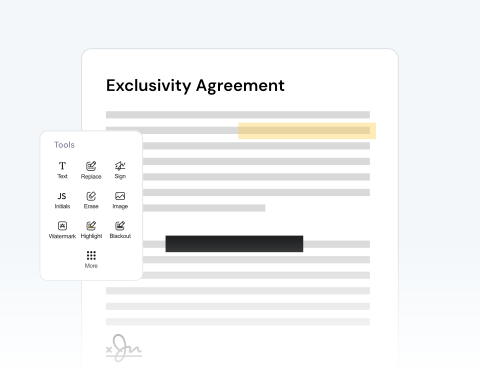

Annotate & comment on PDFs online
Highlight important terms in contracts or add study notes to your documents with our platform, which allows you to review and mark up documents instantly from any online device.
Carregue um PDF e edite-o utilizando a nossa vasta gama de ferramentas.

or drag and drop

SSL Encryption - Supports PDF up to 100 MB and other formats and extensions up to 25 MB



Find out how to modify a PDF online below and optimize your productivity.
Nosso editor de PDF é super simples de usar:
Drag and drop your PDF or use the "Upload" button.
Import images, add a signature, draw directly on the PDF, and more.
Change the format of your file to Word, JPG, etc, if necessary.
Once you're happy with the document, download it and/or share it.
Highlight important terms in contracts or add study notes to your documents with our platform, which allows you to review and mark up documents instantly from any online device.

Noticed a typo or mistake in your document? Upload your file in seconds and make corrections to a resume, update pricing on an invoice, modify dates, and more.

Need to add an image? Or, want to include more text? You can easily insert company logos into reports, tack on new text fields, or circle critical details with our drawing features.

You can share your PDF with others so that they can also add comments. This is very useful if you’re working with other contributors. Share directly from our site to speed up the process.

Our platform is optimized for all major browsers, including Chrome, Safari, Firefox, and Edge. Simply make sure you have reliable access on any operating system.

Our mission is to provide the best PDF editor available. Our tool is reliable, secure, and produces the best results. We pride ourselves on customer satisfaction and make sure your files remain private.



Start by creating a free account and make it easy to edit, convert, compress, and split your files!
Everything you need to know about editing documents.
Nosso editor de PDF online é uma plataforma digital acessível pela Internet que oferece ferramentas e funcionalidades para modificar arquivos PDF (Portable Document Format).
Ao contrário dos softwares independentes que requerem instalação, nosso editor de PDF online funciona diretamente no seu navegador da web, tornando-o prático e, muitas vezes, mais rápido para pequenas edições ou quando você está em trânsito.
Ao abrir um PDF no nosso editor, um menu lateral exibirá várias opções para auxiliar no processo de edição.
Em resumo, você poderá ver o número total de páginas do seu documento. Neste menu, você pode utilizar uma variedade de funções, tais como:
Com certeza! Nossa plataforma foi projetada para oferecer aos usuários controle granular sobre seus documentos. Para cada página do seu PDF, você pode usar ferramentas especializadas para:
Depois que todas as alterações desejadas forem feitas no seu PDF, nossa plataforma oferece várias opções para gerenciar e distribuir o documento editado. Você pode:

