Edit a PDF

Carica un PDF e modificalo utilizzando la nostra vasta gamma di strumenti.

Choose your File

or drag and drop

SSL Encryption - Supports PDF up to 100 MB and other formats and extensions up to 25 MB

Excellent 4.6 out of 5

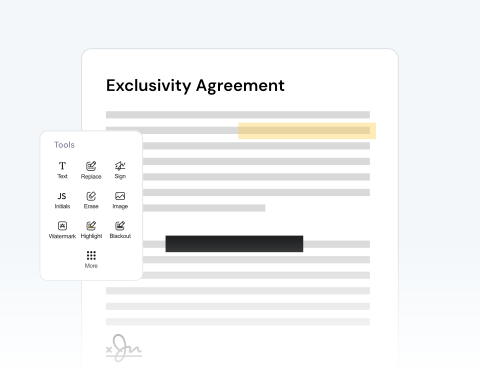
Using our PDF editor, quickly make critical or helpful changes, such as:

  • Modifica il testo esistente o aggiungi e rimuovi
  • Firma direttamente o carica la tua firma
  • Disegna direttamente sul documento
  • Ottieni qualsiasi formato: PDF, PNG, JPG, Word, Excel, PowerPoint

Find out how to modify a PDF online below and optimize your productivity.

Utilizzo del nostro editor PDF

Il nostro editor PDF è semplicissimo da usare:

1

Open your doc

Drag and drop your PDF or use the "Upload" button.

2

Use our edition features

Import images, add a signature, draw directly on the PDF, and more.

3

Convert your PDF

Change the format of your file to Word, JPG, etc, if necessary.

4

Save and share

Once you're happy with the document, download it and/or share it.

Edit PDF Files With MergedPDF to Avoid Mistakes and Increase Your Productivity

Annotate & comment on PDFs online

Highlight important terms in contracts or add study notes to your documents with our platform, which allows you to review and mark up documents instantly from any online device.

Effortless PDF editing to correct errors

Noticed a typo or mistake in your document? Upload your file in seconds and make corrections to a resume, update pricing on an invoice, modify dates, and more.

Add pictures and text to your document

Need to add an image? Or, want to include more text? You can easily insert company logos into reports, tack on new text fields, or circle critical details with our drawing features.

Optimize your document review process

You can share your PDF with others so that they can also add comments. This is very useful if you’re working with other contributors. Share directly from our site to speed up the process.

Make changes to files from any browser

Our platform is optimized for all major browsers, including Chrome, Safari, Firefox, and Edge. Simply make sure you have reliable access on any operating system.

Your trusted and secure PDF editor

Our mission is to provide the best PDF editor available. Our tool is reliable, secure, and produces the best results. We pride ourselves on customer satisfaction and make sure your files remain private.

Key Characteristics of PDF and Word Formats

  • PDF files (.pdf) keep your document’s layout intact across all devices and systems.
  • They can be compressed for easy sharing and support multimedia and interactive elements like videos, links, and fillable forms.
  • Word files (.doc/.docx) are popular for writing and editing text.
  • They offer flexible formatting options, like fonts, alignment, and layout, and support images, tables, and more.

MergedPDF Offers Multiple PDF Solutions

Start by creating a free account and make it easy to edit, convert, compress, and split your files!

  • Edit, convert, merge, and more with our platform
  • Get unlimited edits and downloads
  • Convert in multiple formats
  • 100% private and secure uploads and editing
  • 24/7 customer support

Domande frequenti sul nostro editor PDF

Everything you need to know about editing documents.

Cos'è un editor PDF online?

Il nostro editor PDF online è una piattaforma digitale accessibile via Internet che offre strumenti e funzionalità per modificare i file PDF (Portable Document Format).


A differenza del software standalone che richiede l'installazione, il nostro editor PDF online funziona direttamente dal tuo browser web, rendendolo comodo e spesso più veloce per modifiche minori o quando sei in viaggio.


Quali sono le funzioni di modifica disponibili?

Quando apri un PDF nel nostro editor, un menu laterale mostrerà varie opzioni per facilitare il processo di modifica.


A colpo d'occhio, potrai vedere il numero totale di pagine del tuo documento. Da questo menu, puoi utilizzare una serie di funzioni come:


  • - Annulla o ripristina azioni

  • - Monitora il numero di modifiche apportate

  • - Eliminare pagine o sezioni indesiderate

  • - Ruota le pagine nell'orientamento desiderato

  • - Inserisci nuove pagine o rimuovi quelle esistenti


Posso modificare una singola pagina del PDF?

Assolutamente! La nostra piattaforma è progettata per offrire agli utenti un controllo granulare sui propri documenti. Per ogni pagina del tuo PDF, puoi utilizzare strumenti specializzati per:


  • - Evidenzia sezioni o informazioni importanti

  • - Aggiungere contenuti testuali o modificare il testo esistente

  • - Incorpora immagini o grafica

  • - Inserimento di firme digitali

  • - Imprimere una filigrana


Cosa posso fare quando ho finito di modificare il mio PDF?

Dopo aver apportato tutte le modifiche desiderate al tuo PDF, la nostra piattaforma offre diverse opzioni per gestire e distribuire il documento modificato. È possibile:


  • - Salva la versione modificata

  • - Scarica il file sul tuo dispositivo

  • - Stampa una copia fisica direttamente dal browser

  • - Comprimi le dimensioni del file per semplificare la condivisione o l'archiviazione

  • - Invia il documento direttamente tramite e-mail o link condivisibile

  • - Converti il PDF in altri formati popolari come Word, Excel o PowerPoint


Can I edit a specific page on the PDF?
Yes, you can modify any of the pages that you like. With our tool, you can make any changes you like, whether it’s on just one page, a selection of pages, or on every page.

We give you the freedom to change your PDF however you want.
How do I add drawings to a PDF?
If you have the drawing saved on your computer or device as an image file, like a JPEG or PNG, you can use the image button on our editor to import the picture to your project.

You can then place it where you want on the PDF.

Alternatively, you can use the free draw tool to make your drawing directly on the PDF using your mouse or touch screen.

Once your drawing has been added, you can rotate, resize, and make other changes.
Will editing my PDF reduce the original file quality?
No, modifying your PDF will not reduce its quality. Our online tool is designed to keep the original resolution and formatting of your document. Add text or images, or make other changes, and your PDF will maintain its professional quality after the export.
Can I convert my PDF to another format after editing it?
Yes, with MergedPDF, once you finish making changes to your document, our tool lets you download it as a PDF or convert it to other popular formats, such as Word, JPG, or PNG, in just one click.

A Variety of Tools Beyond PDF Editor